Rakesh Vidyadharan Help

Google Workspace OAuth2

These are the steps I followed to implement OAuth2 authentication against Google Workspace.

Client Set Up

Setting up the client is a straightforward process. I created a new project in Google Workspace, and then added the necessary clients under that project.

  • Log in to Google Workspace as an administrative user and create a new project. I created an internal project as per our requirements. This also removes the necessity for having our application reviewed by Google.

  • Select the Branding menu on the left and provide the information related to your project.

  • Select the Data Access menu and add scopes you require. I added the following scopes:

    • userinfo.email

    • userinfo.profile

    • openid

  • Select the Clients menu and create clients as necessary. I created three clients:

    • Local - for local development

    • Stage - for our staging environment.

    • Production - for our production environment.

  • I stored the client ID's, client secrets, redirect URIs, and other necessary information in config-db. Client secret values are stored encrypted

With these steps, I could move on to implementing the authentication flow.

Authentication Flow

I followed the steps documented and had very little trouble getting the authentication flow to work. I was able to complete the entire setup and development in a few hours.
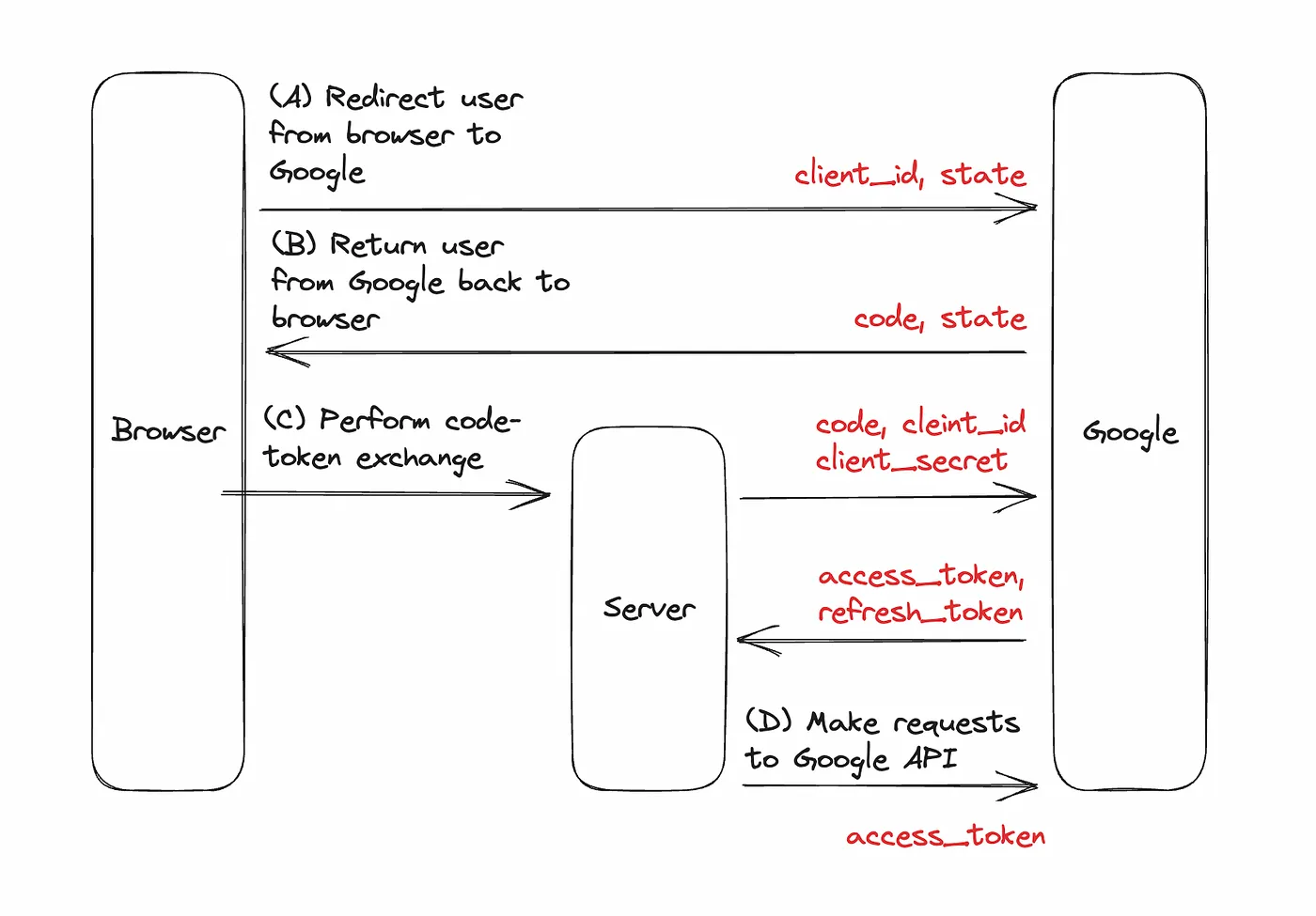
OAuth2 Flow

Wt Application

I extended our existing SSO application to support external authentication sources. We display a list of sources we support in a tab in the welcome screen on the application.

When the user clicks the Google Workspace button, we read the required information from the configuration database and redirect the user to the Google Workspace authentication page.

auto app = ui::Application::instance(); auto model = model::OIDCInformation{}; model.idp = "google-workspace"; model.metadata.created = std::chrono::system_clock::now(); model.metadata.modified = model.metadata.created; model.metadata.user.id = bsoncxx::oid{ "69a8d2abee3f26eb0c0fe1d0" }; if ( !app->getRedirectTo().empty() ) model.redirectTo = app->getRedirectTo(); if ( const auto status = db::create( model, ""sv, true ); !status ) { LOG_WARN << "Error creating OIDC information"; error->setText( "Error creating OIDC information" ); error->setHidden( false ); return; } auto endpoint = boost::urls::url( psso::GWHolder::instance().authorise ); auto params = endpoint.params(); params.append( { "response_type", "code" } ); params.append( { "access_type", "offline" } ); params.append( { "client_id", psso::GWHolder::instance().clientId } ); const auto encrypted = util::Configuration::instance().encrypt( model.id.to_string() ); auto encoded = boost::urls::param_pct_view( "state", encrypted ); endpoint.encoded_params().append( encoded ); encoded = boost::urls::param_pct_view( "redirect_uri", psso::GWHolder::instance().callback ); endpoint.encoded_params().append( encoded ); encoded = boost::urls::param_pct_view( "scope", psso::GWHolder::instance().scope ); endpoint.encoded_params().append( encoded ); app->redirect( endpoint.c_str() ); app->quit();

We create a new OIDC information record in the database and redirect the user to the Google Workspace authentication page. We use the encrypted value of the document ID as the state parameter. In the callback, we decrypt the state parameter and use it to retrieve the OIDC information record.

Callback Handler

The callback handler is implemented as a hidden endpoint in our API. The handler performs the following tasks:

  • Parse the query parameters returned by Google OAuth2 service.

  • Retrieve the OIDC information record from the database.

  • Exchange the authorisation code for an access token.

  • Create an internal user if not existing.

  • Generate a JWT token for the internal user.

  • Redirect the user to Wt application with updated OIDC information.

Parse the query parameters returned by Google OAuth2 service.

const auto params = boost::urls::parse_query( req.query ); const auto pvalue = [&params]( std::string_view key ) -> std::optional<std::string> { const auto iter = params->find( key ); if ( iter == params->end() ) { LOG_INFO << "Missing query parameter " << key; return std::nullopt; } auto ss = std::stringstream{}; ss << boost::urls::decode_view( iter->value ); return ss.str(); }; const auto code = pvalue( "code"sv ); if ( !code ) return error( 400, "Missing query parameter"sv, nullptr, methods, req.header, apm ); const auto state = pvalue( "state"sv ); if ( !state ) return error( 400, "Missing query parameter"sv, nullptr, methods, req.header, apm );

Retrieve the OIDC information record from the database.

auto id = util::Configuration::instance().decrypt( *state ); auto oid = spt::util::parseId( id ); if ( !oid ) { LOG_INFO << "Invalid state parameter " << id << ". APM id: " << apm.id; return error( 400, "Invalid state parameter"sv, nullptr, methods, req.header, apm ); } WRAP_CODE_LINE( auto [status, oidc] = db::retrieve<model::OIDCInformation>( *oid, ""sv, apm ); ) if ( status != 200 || !oidc ) { LOG_WARN << "Error retrieving OIDC information for oid " << *oid << ". APM id: " << apm.id; cp.values.try_emplace( model::ilp::name::APM_ERROR_VALUE, "Error retrieving OIDC information" ); return error( 417, "Error retrieving OIDC information"sv, nullptr, methods, req.header, apm ); }

A simple structure that represents the token information retrieved from the Google Workspace token exchange endpoint.

struct GoogleTokens { BEGIN_VISITABLES(GoogleTokens); VISITABLE(std::string, access_token); VISITABLE(std::string, scope); VISITABLE(std::string, token_type); VISITABLE(std::string, id_token); VISITABLE_DIRECT_INIT(int64_t, expires_in, {0}); END_VISITABLES; };

Exchange the authorisation code for an access token. Google also returns an id_token which is a JWT with the claims requested through the scope parameter. We use this information and avoid needing to make a request to the User Information endpoint.

auto payload = boost::json::object{ {"grant_type", "authorization_code" }, { "code", code }, { "client_id", GWHolder::instance().clientId }, { "client_secret", GWHolder::instance().clientSecret }, { "redirect_uri", GWHolder::instance().redirectUri } }; auto response = cpr::Post( cpr::Url{ GWHolder::instance().tokenEndpoint }, cpr::Body{ boost::json::serialize( payload ) }, cpr::Header{ { "Content-Type", "application/json" } } ); if ( response.status_code != 200 ) { LOG_WARN << "Error retrieving OIDC token. Status code: " << int(response.status_code) << ". " << response.text << ". APM id: " << apm.id; cp.values.try_emplace( model::ilp::name::APM_ERROR_VALUE, "Error retrieving OIDC token" ); return error( 417, "Error retrieving OIDC token"sv, nullptr, methods, req.header, apm ); } auto tokens = spt::util::json::unmarshall<GoogleTokens>( response.text ); if ( tokens.access_token.empty() ) { LOG_WARN << "OIDC token response missing access_token. " << response.text << ". APM id: " << apm.id; cp.values.try_emplace( model::ilp::name::APM_ERROR_VALUE, "OIDC token response missing access_token" ); return error( 417, "OIDC token response missing access_token"sv, nullptr, methods, req.header, apm ); } if ( tokens.id_token.empty() ) { LOG_WARN << "OIDC token response missing id_token. " << response.text << ". APM id: " << apm.id; cp.values.try_emplace( model::ilp::name::APM_ERROR_VALUE, "OIDC token response missing id_token" ); return error( 417, "OIDC token response missing id_token"sv, nullptr, methods, req.header, apm ); } const auto parts = spt::util::split<std::string_view>( tokens.id_token, 3, "." ); const auto model = spt::util::json::unmarshall<GoogleUserInfo>( util::decode( parts[1] ) );

Create an internal user if not existing.

WRAP_CODE_LINE( auto [_, user] = db::retrieve<model::User>( "email", model.email, ""sv, apm, true ); ) if ( !user ) { LOG_INFO << "Creating user " << model.email << ". APM id: " << apm.id; auto& u = user.emplace(); u.id = bsoncxx::oid{}; u.username = model.email; u.email = model.email; u.firstName = model.given_name; u.lastName = model.family_name; u.metadata.created = std::chrono::system_clock::now(); u.metadata.modified = u.metadata.created; u.metadata.user.id = bsoncxx::oid{ "5f70ee572fc09200086c8f23" }; auto& p = u.properties.emplace_back(); p.name = "idp"; p.value = oidc.idp; WRAP_CODE_LINE( const auto st = db::create( u, apm ); ) if ( st != 200 ) { LOG_WARN << "Error creating user " << model.email << ". APM id: " << apm.id; cp.values.try_emplace( model::ilp::name::APM_ERROR_VALUE, "Error creating user" ); return error( 417, "Error creating user"sv, nullptr, methods, req.header, apm ); } }

Generate the JWT token for the internal user.

auto token = util::generateToken( *copt, *user, std::chrono::duration_cast<std::chrono::minutes>( std::chrono::hours{ 24 } ), model::JwtToken::Type::idp ); WRAP_CODE_LINE( const auto tstatus = db::create( token, apm, true ); ) if ( tstatus != 200 ) { cp.values.try_emplace( model::ilp::name::APM_ERROR_VALUE, model::ilp::value::APM_DATABASE_ERROR ); return error( 417, "Error creating token"sv, nullptr, methods, req.header, apm ); } db::impl::clearSessions( *user, token, apm ); oidc->jwtId = token.id; oidc->metadata.modified = std::chrono::system_clock::now(); WRAP_CODE_LINE( const auto _os = db::update( *oidc, ""sv, apm ); ) if ( _os != 200 ) { LOG_WARN << "Error updating OIDC info with jwt id " << token.id << ". APM id: " << apm.id; cp.values.try_emplace( model::ilp::name::APM_ERROR_VALUE, "Error updating OIDC info" ); return error( 417, "Error updating OIDC info"sv, nullptr, methods, req.header, apm ); }

Redirect user to Wt application with updated OIDC information.

auto endpoint = boost::urls::url( GWHolder::instance().success ); auto encoded = boost::urls::param_pct_view( "nonce", *state ); endpoint.encoded_params().append( encoded ); LOG_INFO << "Writing response for " << req.path << "; redirecting to " << endpoint.c_str() << ". APM id: " << apm.id; auto resp = Response{ req.header }; resp.headers.clear(); resp.headers.emplace( "location", endpoint.c_str() ); resp.headers.emplace( "content-length", "0" ); resp.status = 302; resp.jwt = std::make_shared<model::JwtToken>( token.token() ); resp.body.clear(); resp.compressed = false; resp.correlationId = correlationId( req ); resp.entity = model::OIDCInformation::EntityType(); return resp;

Receiver

A resource in the Wt application receives the redirect from the API callback handler. This is strictly not necessary, however, we create and manage the cookie for browser-based applications purely in the Wt application. This handler retrieves the JWT through the updated OIDC information and creates a cookie, which establishes a session for the user.

const auto write = [&response]( boost::json::object&& obj ) { auto json = boost::json::serialize( obj ); response.setContentLength( json.size() ); response.out() << json; }; auto nonce = request.getParameter( "nonce"s ); if ( !nonce || nonce->empty() ) { LOG_WARN << "No nonce parameter in request"; return write( boost::json::object{ { "code"sv, 404 }, { "cause"sv, "Not found"sv } } ); } auto id = util::Configuration::instance().decrypt( *nonce ); auto oid = spt::util::parseId( id ); if ( !oid ) { LOG_WARN << "Invalid nonce " << id; return write( boost::json::object{ { "code"sv, 404 }, { "cause"sv, "Not found"sv } } ); } const auto [s, _, m] = db::retrieve<model::OIDCInformation>( *oid, ""sv ); if ( !m ) { LOG_WARN << "No OIDC information with id " << id; return write( boost::json::object{ { "code"sv, 404 }, { "cause"sv, "Not found"sv } } ); } if ( m->jwtId == model::DEFAULT_OID ) { LOG_WARN << "No JWT token in OIDCInformation: " << id; return write( boost::json::object{ { "code"sv, 404 }, { "cause"sv, "Not found"sv } } ); } const auto [_ds, _dt] = db::remove<model::OIDCInformation>( *oid, ""sv, ""sv, true ); if ( _ds != 200 ) LOG_WARN << "Error removing OIDC information: " << id; auto cookie = Wt::Http::Cookie( poidc::Data::instance().cookieName, util::Configuration::instance().encrypt( m->jwtId.to_string() ), poidc::Data::instance().env == "local"sv ? std::chrono::hours{ 1 } : std::chrono::hours{ 24 } ); cookie.setSecure( poidc::Data::instance().env != "local" ); cookie.setHttpOnly( true ); if ( poidc::Data::instance().env != "local" ) cookie.setDomain( "<parent domain>" ); cookie.setPath( "/"s ); cookie.setSameSite( Wt::Http::Cookie::SameSite::Lax ); response.addHeader( "Set-Cookie", to_str( cookie ) ); const auto location = m->redirectTo.empty() ? "/a"s : m->redirectTo; response.addHeader( "location", location ); response.setContentLength( 0 ); response.setStatus( 302 );
Last modified: 06 March 2026